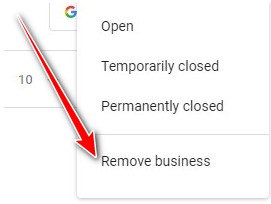
If you want to remove a business from Google Maps, the correct method depends on what you are trying to achieve. If you own the Business Profile, you can remove its content and managers from your Google account, but that does not necessarily mean the listing immediately disappears from Google Maps and Search. If a business has permanently closed, the better option is to mark it as permanently closed. If you do not own the listing and it is inaccurate or ineligible, you can request its removal through Google Maps. This distinction matters because many business owners use the words delete, remove and close interchangeably even though Google treats them differently. In this guide, you’ll learn exactly which option to use and the steps to follow. Remove vs Close vs Delete: What’s the Difference? Before you make any changes, decide what you actually want to accomplish. Option Best For What Happens Remove from your Google account You no longer want to manage the profile Removes profile content and managers from your account, but the business may still appear on Google Mark as permanently closed The business has actually shut down The profile can remain visible but is shown as permanently closed and gradually becomes less prominent Request removal from Google Maps The listing is ineligible, fake, incorrect or doesn’t belong there Google reviews the removal request Transfer ownership Someone else should manage the business Ownership is transferred instead of removing the listing Google specifically states that removing a Business Profile from your account does not guarantee that the business will disappear from Search and Maps. So, if your business has simply closed, don’t automatically delete everything from your account. Marking the business as permanently closed may be the appropriate option. How to Remove a Business Profile You Own If you own or manage the Business Profile and no longer want to manage it, Google provides an option to remove the profile’s content and managers from your account. Step 1: Sign in to the Correct Google Account Sign in to the Google Account associated with the Business Profile. You must have the appropriate ownership permissions to remove profile content and managers. Google states that only primary owners can perform this removal, while managers cannot remove the profile. Step 2: Open Your Business Profile Find and open the Business Profile you want to remove. You can do this through Google Search or Google Maps while signed into the account that manages the profile. Step 3: Open Business Profile Settings Select the profile’s settings menu. Then go to: Business Profile settings → Remove Business Profile Step 4: Choose “Remove Profile Content and Managers” Select: Remove profile content and managers Google warns that this action is permanent. Owner-added posts, photos, videos and review replies can be removed, and the content cannot be recovered through the profile. Step 5: Confirm the Removal Follow the confirmation steps displayed by Google. Once the removal is completed, you will no longer manage the profile through that account. However, remember that the business may still appear on Google Search and Maps. How to Mark Your Business as Permanently Closed If the business has genuinely stopped operating, marking it as permanently closed is usually more appropriate than simply removing the profile from your Google account. Google allows businesses to update their profile to show that the location is Permanently closed. Step-by-Step The profile may continue to appear in Google Search and Maps when people specifically search for the business, but Google will clearly identify it as permanently closed. Why You Shouldn’t Delete a Closed Business Immediately Suppose you operated a restaurant in Accra for five years and then closed permanently. Customers may still search for the restaurant by name. Keeping the listing and marking it as permanently closed can provide useful information rather than leaving customers wondering whether the business is still operating. Google says permanently closed businesses may still appear for users who search for them. How to Remove a Business from Google Maps That You Don’t Own You don’t need to own a Business Profile to request its removal. However, Google does not provide a general “delete any business you don’t like” option. The listing needs to have a legitimate reason for removal, such as being a business that: Google says users can request removal of a business even if they do not own the Business Profile. Step 1: Open Google Maps Go to Google Maps and sign in to your Google Account. Step 2: Find the Business Search for the business or locate it directly on the map. Open the Business Profile you want to report. Step 3: Select “Suggest an Edit” Choose: Suggest an edit Step 4: Choose the Appropriate Removal Option Select the option indicating that the business is closed or not located there, or another appropriate option presented by Google. Google’s current instructions specifically direct users to select “Place is closed or not here” and then choose the applicable reason, such as “Doesn’t exist here” or another listed reason. Step 5: Submit the Request Submit your request. Google may send a status email or ask follow-up questions. If Google approves the request, the business can be removed from Search and Maps. What If Someone Created a Fake Business Listing? If someone created a fake business listing, don’t try to delete it yourself. Instead, report the listing to Google and explain why it is inaccurate or ineligible. For example, you may discover a supposed business at an address in Kumasi that does not actually exist. You can use Google’s removal process to report the listing. If the problem involves fraudulent business information, Google also provides a business redressal process for certain violations. What If the Business Has Moved to a New Location? Don’t automatically delete the old listing if the business has simply moved. The correct approach may be to update the Business Profile with the new information rather than treating the business as permanently closed. For example, if a salon moves from Osu