
Why Your Facebook Ad Is Stuck in Review or Preparing (And How to Fix It)
Launching a Facebook advertising campaign can be exciting, especially when you’re promoting a new product, generating leads, or preparing for an important business campaign. You carefully create your advert, select your audience, define your budget, and click Publish, expecting your campaign to start reaching customers within a short time.
Instead, your advertisement remains stuck with a status like “In Review,” “Preparing,” or even “Active” without delivering any impressions. Hours pass, then an entire day, and sometimes even longer. Your campaign still isn’t running, leaving you frustrated and wondering whether you’ve done something wrong.
This is one of the most common challenges faced by advertisers using Meta’s advertising platform. Whether you’re a first-time advertiser or an experienced digital marketer, there are occasions when Facebook ads take longer than expected to move through the review process or fail to deliver after approval.
For businesses in Ghana and across the world, these delays can have real consequences. A restaurant promoting a weekend offer, a real estate company launching a property campaign, or an online store advertising a limited-time discount may lose valuable sales opportunities if campaigns do not start on time.
Fortunately, a delayed Facebook ad does not always mean something is seriously wrong. In many cases, the issue can be traced to policy reviews, account settings, payment verification, campaign configuration, audience selection, or temporary system delays within Meta’s advertising infrastructure.
According to Meta, every advertisement submitted through its platform goes through an automated and, in some cases, manual review process to ensure compliance with its Advertising Standards and Community Standards. Some ads are approved within minutes, while others may require additional review depending on their content, targeting, or account history. This review process is designed to protect users and maintain the quality of advertising across Facebook, Instagram, Messenger, and the wider Meta ecosystem.
At Techpreneur Academy, we’ve seen many business owners become discouraged when campaigns don’t begin running immediately. In many cases, the solution is relatively simple once the underlying cause is identified. Through the Global Institute of Entrepreneurship and Technology (GIET), entrepreneurs and digital marketers also receive practical training on Meta advertising, campaign optimization, and troubleshooting techniques that help prevent common advertising problems before they affect business performance.
In this comprehensive guide, you’ll learn:
- What it means when a Facebook ad is stuck in review or preparing.
- Why Meta ads sometimes fail to deliver.
- The most common causes of delayed ad approval.
- Step-by-step troubleshooting methods that actually work.
- When you should wait and when you should take action.
- How to request another review if your ad is rejected.
- Best practices to reduce future review delays.
By the end of this guide, you’ll have a clear understanding of how Meta’s review system works and what practical steps you can take to get your campaigns running as quickly as possible.
Understanding Facebook’s Ad Review Process
Why Meta Reviews Every Advertisement
Every Facebook Ad Must Pass Meta’s Review System
Before an advertisement is shown to users, Meta reviews it to determine whether it complies with its advertising policies. This review applies to ads placed across Facebook, Instagram, Messenger, and the Audience Network.
The review process combines advanced machine learning systems with human reviewers in certain situations. Automated systems handle the majority of advertisements, while manual reviews may occur if the system identifies content that requires closer examination.
During this process, Meta evaluates several elements of your campaign, including:
- Images and videos
- Headlines and primary text
- Landing pages
- Call-to-action buttons
- Audience targeting
- Business account history
- Payment status
- Compliance with Meta Advertising Standards
Most advertisements are reviewed within a relatively short period. However, more complex campaigns or accounts with additional verification requirements may take longer.
Understanding this process helps explain why some advertisements remain in review longer than others.
What Does “In Review” Actually Mean?
Your Advertisement Is Being Evaluated Before Delivery
If your Facebook ad displays an “In Review” status, it generally means Meta has received your campaign but has not yet approved it for publication.
While your ad is in review:
- It will not be shown to your target audience.
- You will not receive impressions.
- Your advertising budget will generally not be spent.
- Campaign delivery remains paused until approval.
An ad can remain in review because of routine processing, additional policy checks, or technical issues affecting Meta’s review systems.
In many situations, patience is the correct response. However, if the review period becomes unusually long, further investigation is necessary.
What Does “Preparing” Mean in Meta Ads Manager?
Understanding the Preparing Status
Preparing Means Meta Is Still Processing Campaign Assets
Many advertisers assume that “Preparing” and “In Review” mean the same thing.
Although they are related, they represent different stages.
When an advertisement shows Preparing, Meta is often processing campaign information before it becomes eligible for review or delivery.
This stage may involve:
- Uploading creative assets
- Processing videos
- Syncing campaign settings
- Verifying campaign configurations
- Preparing delivery systems
Large video files, multiple ad variations, or newly created campaigns may spend more time in this stage than simple image advertisements.
Normally, the preparing stage is temporary.
However, if your Facebook ad is stuck preparing for many hours without progressing, another issue may be preventing the campaign from moving forward.
Common Reasons Ads Stay in Preparing
Campaign Assets Have Not Finished Processing
Videos require encoding before Meta can deliver them efficiently.
If processing is interrupted or delayed, campaigns may remain in Preparing longer than expected.
Recent Campaign Changes
Editing an active campaign may temporarily move it back into Preparing while Meta updates campaign information.
Temporary Platform Delays
Occasionally, Meta experiences system-wide delays that affect campaign processing across multiple advertising accounts.
When this happens, many advertisers may report similar issues simultaneously.
Checking Meta’s official communication channels or trusted industry communities can help determine whether the problem is widespread rather than account-specific.
Why Your Meta Ads Are Not Delivering
Approval Does Not Always Mean Delivery
An Approved Ad Can Still Receive Zero Impressions
One of the most confusing situations occurs when an advertisement has already been approved but still receives no impressions.
Many advertisers assume approval automatically means delivery.
In reality, several additional systems influence whether Meta begins showing your advertisement.
Common reasons include:
- Audience size is too small.
- Budget is too limited.
- Bid strategy is too restrictive.
- Campaign start date is in the future.
- Payment method cannot be charged.
- Ad relevance is low.
- Learning phase limitations.
- Account restrictions.
Understanding the distinction between approval and delivery is essential for troubleshooting Meta ads not delivering.
Step-by-Step Troubleshooting Guide
Step 1: Check the Current Campaign Status
Identify Exactly Where the Campaign Has Stopped
Before making any changes, determine the exact status displayed in Meta Ads Manager.
Ask yourself:
- Is the campaign still Preparing?
- Is it In Review?
- Has it been Approved?
- Is it Active but showing zero impressions?
- Does it display an error notification?
Each status points to a different underlying issue.
Avoid making unnecessary edits before identifying the correct stage.
Step 2: Give Meta Enough Time
Not Every Delay Indicates a Problem
While many advertisements are reviewed quickly, Meta states that some campaigns may require additional review time depending on their complexity or policy considerations.
Repeatedly editing your advertisement during this period may restart portions of the review process, extending the delay.
If your advertisement has only recently been submitted, allowing additional time is often the best first step.
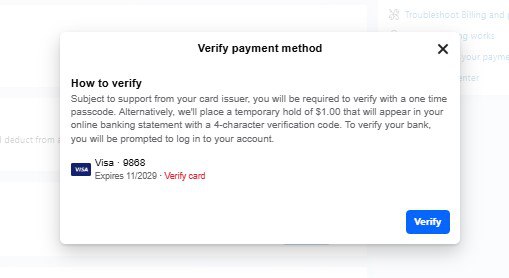
Step 3: Check for Payment or Billing Problems
An Invalid Payment Method Can Prevent Campaign Delivery
Even if your advertisement complies with Meta’s advertising policies, campaigns may fail to deliver if payment issues exist.
Review:
- Your payment method.
- Outstanding account balances.
- Billing notifications.
- Account spending limits.
- Currency settings.
Businesses operating in Ghana should also ensure that the payment method linked to their advertising account supports international transactions where applicable, as declined payments can delay or pause campaign delivery.
Step 4: Review Your Ad Against Meta’s Advertising Policies
Policy Violations Are One of the Most Common Causes of Delayed Reviews
If your Facebook ad has been in review for an unusually long time or has been rejected, the first place to investigate is whether your ad complies with Meta’s Advertising Standards.
Meta uses a combination of artificial intelligence and human reviewers to evaluate advertisements. Even if your ad appears harmless, certain words, images, targeting options, or landing page content may trigger additional reviews.
Pay close attention to:
- Misleading or exaggerated claims
- Before-and-after images in sensitive industries
- Misrepresentation of products or services
- Adult or restricted content
- Copyrighted images or videos used without permission
- Excessive use of sensational language
- Landing pages that do not match the advert
For example, if your advert promises “Guaranteed results in 24 hours” or “Earn GH₵10,000 every week with no experience,” Meta may flag it for misleading or unrealistic claims.
Instead, write honest, accurate, and transparent advertising copy that clearly reflects what customers should expect.
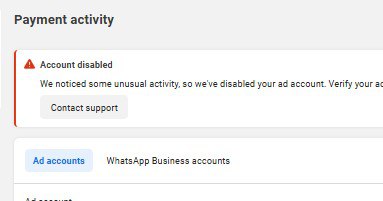
Step 5: Check Your Account Quality
A Restricted Ad Account Can Prevent Campaign Delivery
Sometimes the problem isn’t the advert itself.
Meta continuously monitors advertiser behaviour to protect users from spam, fraud, and policy abuse. If your advertising account, Business Portfolio, or Facebook Page has previous policy violations, delivery may be delayed while additional checks are completed.
Visit your Account Quality section inside Meta Business Suite to check for:
- Restricted advertising accounts
- Disabled assets
- Policy warnings
- Identity verification requests
- Business verification requests
Many advertisers overlook these notifications, only to discover later that Meta has been waiting for additional information before allowing campaigns to continue.
Step 6: Verify Your Business Information
Business Verification Can Improve Account Trust
Businesses that regularly advertise, especially those spending larger budgets, should consider completing Meta’s Business Verification process.
Verification helps Meta confirm that your business is legitimate and may reduce trust-related issues over time.
You may be asked to provide:
- Business registration documents
- Company address
- Business phone number
- Official email address
- Website ownership verification
For growing businesses in Ghana, completing these verification steps early can help establish long-term advertising stability.
Step 7: Confirm Your Campaign Schedule
Check Whether Your Campaign Has Actually Started
This sounds obvious, but it is surprisingly common.
Many advertisers accidentally schedule campaigns to begin at a future date or pause campaigns without realizing it.
Review your campaign settings and confirm:
- Start date
- End date
- Time zone
- Campaign status
- Ad Set status
- Advertisement status
All three levels—Campaign, Ad Set, and Ad—must be active before delivery can begin.
Step 8: Review Your Audience Size
Overly Narrow Targeting Can Limit Delivery
One reason Meta ads are not delivering is because the audience you’ve selected is too small.
For example, targeting:
- Women
- Ages 28–30
- Living within 2 km of a small town
- Interested in one very specific hobby
may leave Meta with too few people to deliver your advertisement efficiently.
Instead, consider expanding:
- Age range
- Geographic area
- Interests
- Behaviours
Broader audiences often give Meta’s optimization system more flexibility to find people who are likely to respond.
Step 9: Check Your Budget and Bid Strategy
Budgets That Are Too Low Can Affect Delivery
Although Facebook Ads are flexible, extremely low budgets may struggle in competitive markets.
Delivery may slow when:
- Audience competition is high.
- Your bid is lower than competing advertisers.
- Daily budgets limit optimization.
Rather than increasing your budget dramatically, focus on improving your creative, targeting, and offer before scaling spending.
A better advertisement often outperforms a larger budget.
Step 10: Test a New Advertisement
Sometimes Starting Fresh Is Faster
Occasionally, an advert becomes stuck because of an isolated processing issue.
Instead of repeatedly editing the same advert, try duplicating the campaign and creating a fresh version.
Many experienced advertisers use this approach after confirming there are no policy or payment issues.
Be careful not to duplicate campaigns unnecessarily, as this can create overlapping audiences and affect performance.
Advanced Troubleshooting Techniques
Check Whether Meta Is Experiencing a Platform-Wide Issue
Sometimes the Problem Isn’t Your Account
Although Meta’s systems are generally reliable, temporary service interruptions do occur.
If many advertisers are reporting:
- Ads stuck in review
- Campaigns stuck preparing
- Ads not delivering
the issue may be affecting the wider platform rather than your individual account.
Before making significant changes, check:
- Meta Business Status updates
- Official Meta announcements
- Trusted digital marketing communities
- Industry forums where advertisers share recent experiences
If a platform-wide issue exists, waiting may be the best solution.
Review Your Landing Page
Your Website Is Part of the Review Process
Meta does not only review the advertisement itself.
It also reviews where the advert sends users.
Landing pages should:
- Load quickly
- Match the advert
- Work properly on mobile devices
- Provide accurate information
- Avoid misleading claims
If your advert promotes a product but the landing page is broken or unrelated, approval may be delayed or the advert rejected.
Avoid Repeatedly Editing Ads Under Review
Frequent Changes Can Restart the Review Process
Many advertisers become impatient and continually edit headlines, images, or targeting while the campaign is under review.
Each significant edit may require Meta to review the advertisement again.
If your advert has only recently entered review, avoid making unnecessary changes unless you discover a genuine problem.
When Should You Contact Meta Support?
Know the Difference Between Normal Delays and Technical Problems
Some Delays Require Assistance From Meta
If your advert has remained in review for an unusually long period after you’ve completed all troubleshooting steps, it may be time to contact Meta.
According to Meta, if an advertisement is rejected and you believe the decision was made in error, you can request another review through Business Support Home.
You should consider contacting Meta when:
- Your advert has remained in review far longer than normal.
- Your ad account appears restricted without explanation.
- Your campaign is approved but consistently fails to deliver despite meeting all requirements.
- You believe your advert was rejected incorrectly.
When contacting support, provide:
- Campaign ID
- Ad ID
- Screenshots
- A clear explanation of the issue
- Any troubleshooting steps you’ve already completed
Providing detailed information can help the support team investigate your case more efficiently.
Expert Insights From Digital Marketing Professionals
Facebook Advertising Is More Than Clicking the Publish Button
Successful Campaigns Depend on Strong Foundations
Many businesses assume that once an advert is approved, success is guaranteed.
In reality, campaign performance depends on a combination of:
- Strategic planning
- Audience research
- Creative quality
- Technical setup
- Continuous optimization
Experienced marketers spend just as much time preparing campaigns as they do managing them after launch.
Learning how Meta’s systems work helps businesses avoid many of the delays and frustrations that beginners commonly experience.
Prevention Is Better Than Troubleshooting
Good Campaign Preparation Reduces Approval Delays
Businesses that consistently achieve successful advertising results usually follow structured processes before launching campaigns.
These include:
- Reviewing Meta’s Advertising Standards.
- Testing landing pages.
- Using high-quality creative assets.
- Ensuring payment methods are valid.
- Checking campaign settings carefully.
Small preparation steps can prevent hours—or even days—of unnecessary delays.
Common Mistakes That Keep Facebook Ads Stuck in Review
Editing Ads Too Frequently
Constant Changes Interrupt the Review Process
Repeated edits can restart portions of Meta’s review workflow.
Whenever possible, wait until the review process is complete before making additional changes.
Ignoring Account Notifications
Important Warnings Often Go Unnoticed
Many advertisers overlook notifications requesting:
- Identity verification
- Payment updates
- Business verification
- Policy acknowledgements
These notifications may directly affect campaign approval.
Using Misleading Marketing Claims
Overpromising Creates Policy Risks
Advertising should focus on realistic outcomes supported by genuine value.
Avoid sensational claims that cannot be substantiated.
Forgetting the Customer Experience
Approval Is Only the First Step
An approved advertisement does not automatically generate sales.
Businesses should also ensure:
- Fast customer responses
- Professional communication
- Clear offers
- Reliable delivery processes
A successful advertising campaign continues long after Meta approves the advert.
Best Practices to Prevent Facebook Ads From Getting Stuck in Review
Many Facebook ad review issues can be avoided before you even click the Publish button. While no advertiser can completely eliminate review delays, following proven best practices significantly improves the chances of faster approvals and smoother campaign delivery.
Businesses that consistently achieve good results rarely rely on luck. They follow repeatable processes that align with Meta’s advertising policies and platform recommendations.
Build Trust With a Complete Business Profile
A Well-Established Business Account Inspires Greater Confidence
Meta evaluates more than just your advertisement. Your business profile also contributes to your overall account quality.
Before running campaigns, ensure your business has:
- A completed Facebook Business Page
- An Instagram Business account (if applicable)
- Accurate contact information
- A professional profile and cover image
- A working website or landing page
- Consistent branding across all platforms
For businesses in Ghana, adding your business location, phone number, email address, and WhatsApp Business contact can also improve customer trust after your ads begin delivering.
Always Use Original, High-Quality Creative Assets
Professional Creatives Reduce Review Risks
Low-quality images, misleading graphics, or copyrighted materials can trigger additional reviews or policy violations.
Instead, use:
- Original photographs
- Professionally designed graphics
- High-resolution videos
- Clear branding
- Authentic customer testimonials (with permission)
Avoid using images copied from Google or other businesses without authorization.
Match Your Ad to Your Landing Page
Consistency Improves User Experience
One of Meta’s priorities is ensuring users have a positive experience after clicking an advertisement.
Your landing page should:
- Deliver exactly what the advert promises.
- Load quickly on mobile devices.
- Display accurate pricing and product information.
- Include clear contact details.
- Work properly without broken links.
If your advert promotes a free consultation but your landing page immediately requests payment, Meta may view this as a poor customer experience.
Review Your Campaign Before Publishing
A Five-Minute Review Can Save Hours of Troubleshooting
Before launching your campaign, check:
- Campaign objective
- Audience targeting
- Budget
- Schedule
- Payment method
- Creative assets
- Landing page
- Call-to-action
Many delivery problems result from simple configuration mistakes that could have been identified before publication.
Practical Action Plan for Advertisers
If your Facebook ad is currently stuck in review, preparing, or not delivering, work through this checklist before making major changes.
Immediate Actions
Step 1: Check the Campaign Status
Determine whether the advert is:
- Preparing
- In Review
- Approved
- Active
- Rejected
Understanding the status helps you choose the right solution.
Step 2: Verify Payment Information
Confirm that:
- Your payment method is valid.
- There are no unpaid balances.
- Your account has no billing restrictions.
Step 3: Review Meta Policy Compliance
Carefully compare your advert against Meta’s Advertising Standards.
Pay particular attention to:
- Claims
- Images
- Targeting
- Landing pages
Step 4: Check Account Quality
Review your Account Quality dashboard for:
- Restrictions
- Warnings
- Verification requests
Resolve any outstanding issues before expecting campaigns to deliver normally.
Step 5: Contact Meta Business Support When Necessary
If you’ve completed the troubleshooting steps and your advert still appears to be stuck without a clear explanation, you may need to escalate the issue.
Meta advises advertisers who believe their advertisement was rejected incorrectly to request another review through Business Support Home.
When contacting support:
- Explain the issue clearly.
- Include relevant campaign IDs.
- Attach screenshots if necessary.
- Describe the troubleshooting steps you’ve already completed.
Providing complete information often helps support representatives resolve issues more efficiently.
Final Thoughts: Solving Facebook Ad Review Problems the Right Way
Experiencing a Facebook ad stuck in review, Facebook ad stuck preparing, or Meta ads not delivering can be frustrating, especially when your business depends on timely advertising campaigns.
Fortunately, most review and delivery issues have practical solutions.
Rather than making repeated changes or creating multiple duplicate campaigns, take a systematic approach:
- Understand the current campaign status.
- Review your account settings.
- Verify payment information.
- Ensure policy compliance.
- Check your audience and campaign configuration.
- Escalate the issue through Meta Business Support Home when necessary.
Digital advertising platforms continue to evolve, and understanding how Meta’s systems work is becoming an essential skill for business owners, marketers, and entrepreneurs.
At Techpreneur Academy, our goal is to help businesses understand the technology behind successful digital marketing—not just the tools themselves.
For individuals who want hands-on experience creating, managing, optimizing, and troubleshooting Facebook, Instagram, and TikTok advertising campaigns, GIET provides practical digital marketing training designed to build real-world skills that can be applied to businesses across Ghana and beyond.
The more you understand the platform, the less time you’ll spend troubleshooting—and the more time you’ll spend growing your business.
Frequently Asked Questions About Facebook Ad Review Issues
Long Reviews Can Have Several Causes
Although many ads are reviewed quickly, longer reviews may occur because of policy checks, business verification, payment issues, account quality concerns, or temporary delays within Meta’s systems. If the delay becomes unusually long after you’ve confirmed everything is correct, consider contacting Meta through Business Support Home.
Preparing Means Meta Is Still Processing Your Campaign
This usually happens while Meta processes creative assets, verifies campaign settings, or prepares your advert for review and delivery. Large video files or recent edits may extend this stage.
Approval Does Not Guarantee Delivery
Ads may remain active without receiving impressions because of audience size, budget limitations, bidding strategy, scheduling issues, payment problems, or account restrictions.
Only After Other Troubleshooting Steps
Duplicating a campaign may help if you suspect a technical issue, but it should not be your first solution. Always verify policy compliance, payment settings, and account quality before creating duplicate campaigns.
Yes
Significant edits to an advertisement that is already under review may trigger another review cycle, potentially increasing approval time.
Use Meta Business Support Home
If you believe your advertisement was rejected incorrectly, Meta allows advertisers to request another review through Business Support Home. Make sure you clearly explain why you believe the decision should be reconsidered and provide any supporting information requested.
It Can Improve Trust
Verified businesses often experience fewer trust-related issues because Meta has additional information confirming the legitimacy of the business.
Yes
Facebook and Instagram remain important digital marketing platforms for businesses in Ghana. When campaigns are properly planned, targeted, and optimized, they can help generate leads, increase brand awareness, and support business growth.