If you are trying to run Facebook or Instagram ads in Ghana, adding a payment method is only one part of the process. Meta may also require you to verify the payment method before you can continue advertising.
Payment verification helps confirm that the payment method belongs to you and can be used for advertising charges. If verification is incomplete, your ads may fail to deliver, your account may show a payment-related restriction, or you may be unable to create new campaigns.
For Ghanaian businesses using bank cards for Meta advertising, understanding the verification process can save time and prevent unnecessary payment failures.
This guide explains how to verify a Facebook payment method, where to look for a verification code, what to do if you cannot find it, and how to troubleshoot common problems.
Why does Facebook ask you to verify a payment method?
Meta may ask you to verify a payment method as part of its payment and security processes.
When you add a debit or credit card to your advertising account, Meta may place a small temporary transaction or otherwise require confirmation of the payment method.
The exact verification experience can vary depending on the payment method, account and payment setup.
For advertisers, the important point is simple: adding a card does not always mean the payment method is immediately ready for advertising.
You may need to complete an additional verification step before your campaigns can run normally.
How to verify Facebook payment method
The exact screens can change as Meta updates Ads Manager, but the general process is straightforward.
Step 1: Open your Meta advertising account
Log in to the Facebook account connected to your business and open Meta Ads Manager or your business payment settings.
Make sure you are working in the correct business and advertising account.
This is particularly important if you manage several Facebook pages, businesses or ad accounts.
Step 2: Go to payment settings
Look for the Billing & payments, Payment settings, or similar payment section in your advertising account.
The wording may vary depending on the account interface and Meta’s current layout.
You should see the payment methods connected to the advertising account.
Step 3: Select the payment method that needs verification
Find the card or payment method you recently added.
If Meta requires verification, you may see a prompt asking you to verify the payment method.
Follow the instructions displayed by Meta.
Step 4: Check your bank transaction
If Meta requires a verification code connected to a card transaction, check your bank’s transaction information.
Depending on your Ghanaian bank, you may be able to see transaction details through:
- Your bank’s mobile app
- Internet banking
- SMS transaction alerts
- Your bank statement
- Customer support
The verification information may appear in the transaction description or related payment details.
Step 5: Enter the verification information
Return to your Meta payment settings and enter the requested verification information exactly as provided.
Avoid guessing the code.
If the code is incorrect, the payment method may remain unverified or you may have to restart the verification process.
Step 6: Confirm the payment method
Once the required information has been accepted, Meta should update the payment method’s status.
You can then check your payment settings again before launching or restarting your advertising campaign.
Where can I find the Facebook payment verification code?
If Meta asks you for a verification code connected to a card transaction, the first place to check is your bank transaction history.
For Ghanaian advertisers, check your bank’s:
Mobile banking app → Transaction history → Relevant Meta/Facebook transaction → Transaction details
You should also check SMS alerts if your bank sends detailed transaction notifications.
If the transaction description does not contain enough information, contact your bank through its official customer-support channel.
Do not share your banking password, PIN, OTP or full card details with someone claiming to be able to verify your Facebook payment method.
What if the Facebook verification code is not showing?
This is one of the most common problems advertisers encounter.
If you cannot find the verification information, try these steps:
Check your transaction history
Do not rely only on an SMS notification. Open your banking app or internet banking platform and inspect the full transaction details.
Wait for the transaction to appear
Some transactions may not immediately display complete information.
Give your bank’s system time to update before assuming that the verification process has failed.
Check that you added the correct card
If you have multiple cards, make sure you are checking the transaction history for the exact card connected to your Meta advertising account.
Contact your bank
If the transaction appears but the necessary information is missing, your bank may be able to explain the transaction description.
Check Meta’s payment settings again
If the verification request has disappeared or the payment method has changed status, you may not need to repeat the process.
Why is my Facebook payment method still not verified?
Several issues can cause a payment method to remain unverified.
Incorrect card information
Check that the card number, expiry date and other requested information were entered correctly.
Bank restrictions
Your bank may decline online, international or recurring transactions depending on the card and account settings.
Insufficient funds
Make sure the card has sufficient funds available for the required transaction.
Payment method restrictions
Not every payment method works in exactly the same way for every Meta advertising account.
Account-related payment problems
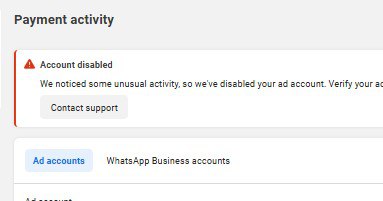
Sometimes the problem is not the card itself. Your advertising account may have a separate payment issue or restriction that needs to be resolved.
Do not repeatedly add and remove cards without first identifying the actual problem. Multiple failed payment attempts can make troubleshooting more complicated.
Facebook payment verification for Ghanaian advertisers
For businesses in Ghana, payment verification can be especially important when using local bank cards to pay for digital advertising.
A business may have a perfectly valid card but still experience a failed Meta payment because of factors such as:
- International online transactions
- Bank security controls
- Card limits
- Available balance
- Incorrect billing information
- Payment verification
- Meta account restrictions
Before starting a campaign, check that your card is enabled for the type of online transaction you are attempting.
If your bank offers transaction controls in its mobile-banking application, review the relevant settings.
Does Facebook payment verification affect Instagram ads?
Yes, it can.
Facebook and Instagram advertising are managed through Meta’s advertising ecosystem. If your Instagram campaign is running through the same Meta advertising account, a payment problem can affect the campaign regardless of whether the advertisement appears on Facebook, Instagram or another Meta placement.
This is why businesses running Instagram ads should not assume that switching from Facebook to Instagram will solve a payment-method problem.
The payment setup needs to be working correctly at the advertising-account level.
What should you do if Facebook keeps declining your card?
If your card continues to be declined after verification, work through the problem systematically.
First, confirm that the card information is correct.
Next, check your available balance and whether your bank permits the relevant online transaction.
Then check your Meta billing section for outstanding balances or account-level payment problems.
If the card works for other online services but consistently fails on Meta, the issue may require assistance from Meta or your bank rather than simply adding another card.
Avoid using unofficial individuals or services that request your Facebook password, bank PIN or OTP to “fix” the payment problem.
How to avoid Facebook payment problems
A few basic practices can make Meta advertising easier to manage.
Keep your billing information accurate
Use accurate billing information and make sure it matches the information associated with your payment method where required.
Monitor your advertising balance
Regularly check your Meta billing area so you know whether there are outstanding charges.
Keep your bank card active
Make sure the card you use for advertising has not expired and has sufficient funds.
Use secure payment practices
Never give another person your banking PIN, OTP or password simply because they claim to be able to verify a Facebook payment.
Keep a backup payment option where appropriate
For businesses that advertise regularly, having an alternative legitimate payment method can reduce disruption when a primary card fails.
Final Thoughts
Knowing how to verify a Facebook payment method is important if you advertise your Ghanaian business through Facebook or Instagram.
The process usually involves checking your Meta payment settings, identifying the payment method requiring verification, reviewing the relevant bank transaction and following Meta’s verification instructions.
If the verification code does not appear, do not guess or share sensitive banking information with a third party. Check your bank transaction history, confirm that the correct card was used, and contact the appropriate official support channel when necessary.
For businesses that depend on Facebook and Instagram advertising for leads and sales, getting the payment setup right is an important part of maintaining uninterrupted campaigns.
Need help setting up or managing Facebook and Instagram advertising for your business in Ghana? Get professional support with campaign setup, payment troubleshooting, targeting and ad management through GIET’s Facebook and Instagram Ads service.
Frequently asked questions
Once your payment method is verified and your ads are running, getting real results is the next challenge. If you would rather have specialists handle it, GIET’s Facebook and Instagram ads management in Ghana can run and optimise your campaigns for you.
Related guides
- Facebook Temporary Hold Unsuccessful: How to Fix the Insufficient Funds Error in 2026
- AD ACCOUNT DISABLED, WE WEREN’T ABLE TO PROCESS PAYMENT
- Facebook Ads in Ghana: How Small Businesses Can Use Facebook and Instagram Ads to Get More Customers
Go to your Meta advertising payment settings, select the payment method requiring verification, and follow the verification instructions displayed by Meta.
If Meta requests a code associated with a card transaction, check your bank’s transaction details, mobile banking application, internet banking or statement.
Verification can be part of Meta’s payment-security process and may be required before a payment method can be used normally for advertising
A supported Ghanaian bank card may be used for Meta advertising, but acceptance can depend on the card, bank, account and payment setup.
If Facebook and Instagram campaigns use the same Meta advertising account, an unresolved payment issue can affect both types of campaigns.
Check that you entered the information exactly as provided and that you are using the transaction associated with the correct card. If the problem continues, contact your bank or use Meta’s official support options.