If Facebook shows “We weren’t able to place a temporary hold on your card” or an “insufficient funds” message when you clearly have money available, the problem may not actually be a lack of funds. A temporary authorization attempt can fail because of payment, currency, bank or Meta-system issues. The first step is to check the attempted amount, confirm your available balance, and then troubleshoot the payment method before escalating the issue.
This problem can be particularly frustrating for businesses running Facebook and Instagram advertising because an unresolved payment issue can prevent campaigns from delivering.
What Is a Facebook Temporary Hold?
A temporary hold is a payment verification or authorization attempt used to check whether a payment method can support advertising charges.
The important distinction is that a temporary hold is not necessarily the same as your actual advertising bill.
For example, your account might have enough money for your planned advertising spend, but Meta may still be unable to complete an authorization attempt on the card.
This covers a situation where an attempted charge of around US$10 failed even though considerably more money was available on the debit card. It also describes another smaller transaction being processed successfully.
That is why simply looking at your bank balance may not immediately explain the problem.
Why Does Facebook Say Insufficient Funds When You Have Money?
There are several possible reasons.
1. The temporary authorization is failing
Your card can have money available while a particular authorization attempt still fails.
This is a possible technical issue from the Facebook system, particularly where repeated attempts continue to produce the same insufficient-funds message despite sufficient funds.
2. Your available balance may not be enough for the authorization
Don’t look only at your advertising budget.
Check the actual amount Meta is attempting to authorize and make sure your card has comfortably more than that amount available.
It is best to have significantly more funds available than the attempted amount rather than keeping the balance close to the exact amount being tested.
3. Currency conversion can affect the transaction
Currency differences can also complicate the amount available on your card.
For example, your Facebook advertising account may operate in US dollars, while your Ghanaian bank card is funded in Ghana cedis.
The amount you expect to cover a US-dollar transaction may differ from the amount ultimately required after exchange rates and applicable bank charges.
It is best to allow additional room for currency conversion and exchange-rate charges when the advertising account and card use different currencies.
4. Your card may have a transaction restriction
Even when your balance is sufficient, a bank can decline a particular online or international transaction.
If the problem continues, check with your bank to determine whether the card permits the type of transaction being attempted.
How to Fix Facebook Temporary Hold Unsuccessful
If you’re seeing the error, work through these steps in order.
Step 1: Check your payment activity
Start by going to your Facebook Ads payment settings.
The steps are:
Facebook → Ads Manager → Billing → Payment Settings → Payment Activity
The exact names or location of these options can change as Meta updates its interface, but the goal is to find your advertising account’s payment activity and settings.
Look at the latest payment attempts.
Find out:
- What amount Facebook attempted to charge
- Whether the attempt failed
- Whether another transaction succeeded
- Which payment method was involved
This information can help you understand whether you’re dealing with a genuine insufficient-funds problem or something else.
Step 2: Make sure your card has enough funds
Don’t keep your balance just slightly above the amount Facebook is attempting to authorize.
If Facebook attempts to authorize US$10, for example, having exactly US$10 equivalent available may not provide enough room for currency conversion or other charges.
It is best to maintaining a substantially higher available balance than the attempted amount when troubleshooting the temporary-hold problem.
For Ghanaian advertisers, this means considering the exchange rate between GHS and USD if your advertising account is billed in dollars.
Step 3: Check your bank card
If the error continues, check whether your debit or credit card is functioning normally.
Confirm:
- The card has not expired.
- The card has sufficient funds.
- The card information is correct.
- Online transactions are enabled where required.
- International transactions are permitted where required.
- Your bank has not blocked the transaction.
If you’re unsure, contact your bank using its official support channel.
Step 4: Try the payment method again
After confirming that your card has sufficient funds and is permitted to make the transaction, you can try the payment process again.
Don’t repeatedly attempt the same transaction without checking the underlying problem.
If the error continues after you’ve confirmed your card and balance, move to the next troubleshooting step.
Should You Remove and Add the Card Again?
You can try changing the payment method, particularly if you suspect the existing card is causing the issue.
There are two options:
- Remove the existing debit card and add it again.
- Add a different legitimate payment card and test whether the problem persists.
However, if the same error appears with multiple cards that have sufficient funds, repeatedly changing cards may not solve the underlying issue.
That is an important clue that the problem may require Meta’s technical support rather than another card.
What If Facebook Still Says Insufficient Funds?
If you’ve:
- Confirmed your balance
- Checked the attempted amount
- Allowed for currency conversion
- Confirmed your card is active
- Tried another legitimate card
- Repeated the payment process
and Facebook still reports insufficient funds, contact Meta Advertising Support.
It is best to this as the next step when changing or re-adding payment cards does not resolve the issue.
How to Contact Facebook Advertising Support
You can access Meta’s business support environment and look for the option to contact advertising support.
The process is:
- Go to Facebook Business Support.
- Select Get Started.
- Choose the option to contact advertising support.
- Select the advertising account experiencing the problem.
- Select the payment-related issue where appropriate.
- Submit the required information.
- Explain the problem clearly.
- Provide screenshots or other requested evidence.
- Submit the case.
This covers submitting contact details, explaining the issue and providing screenshots before contacting support.
What should you include in your support request?
Make your explanation specific.
For example:
My advertising account shows “temporary hold unsuccessful” and “insufficient funds,” but the card has sufficient available funds. I have checked the payment activity and attempted the payment again. Please investigate the payment authorization issue on the account.
Include relevant screenshots showing:
- The error
- Payment activity
- The advertising account
- The payment method, while hiding sensitive card information
Never send your full card number, CVV, PIN, banking password or OTP to someone claiming to be Meta support.
What Happens After You Contact Meta Support?
This covers a case being escalated to a specialised team for review after the initial support contact. The response indicated that the user could expect an update through the contact information supplied with the case.
Some cases may take longer if additional information is required.
Therefore, don’t assume that an immediate response means the problem has been permanently fixed.
Keep your case ID and use it when following up.
Is Facebook Temporary Hold Unsuccessful a Technical Problem?
It can be, particularly when the account has sufficient funds and the problem continues across payment methods.
In some cases, repeated attempts and different cards continued to produce an insufficient-funds message despite adequate funds, and recommends escalation to Meta’s technical team in such circumstances.
However, don’t automatically assume every temporary-hold failure is a Meta technical problem.
First eliminate straightforward causes such as:
- Insufficient available balance
- Incorrect card information
- Expired card
- Bank restrictions
- Currency conversion
- Payment-method problems
Only after these have been checked should you treat a persistent error as potentially requiring technical intervention.
What If Meta Support Doesn’t Resolve the Problem?
If the payment issue continues despite contacting support, you can create a new advertising account as a possible last resort.
This should not be your first solution.
Before creating another advertising account, make sure you understand why the original account is failing and whether the problem is connected to the payment method, business account or Meta’s systems.
Creating additional accounts unnecessarily can make your advertising setup more complicated.
Use a new advertising account only when it is genuinely appropriate and permitted under Meta’s policies.
Facebook Temporary Hold vs Actual Ad Payment
It’s useful to understand the difference.
| Temporary Hold | Actual Ad Payment |
|---|---|
| Used to verify or authorize the payment method | Pays an advertising balance or charge |
| May be a relatively small authorization attempt | Based on your actual advertising charges |
| Can fail even when your expected ad budget is available | Can fail because of balance, card or payment issues |
| May involve currency conversion | May also involve currency conversion |
| Can require payment troubleshooting | May require payment or account troubleshooting |
This distinction helps explain why having money set aside for advertising does not necessarily guarantee that every authorization attempt will succeed.
Common Mistakes to Avoid
Adding the same card repeatedly
Removing and adding the same card several times may not solve a system-level issue.
Assuming “insufficient funds” always means your balance is low
The error message doesn’t necessarily explain the entire cause.
Check your payment activity and the attempted amount first.
Ignoring currency conversion
If your Meta account and bank card use different currencies, allow sufficient room for exchange-rate differences and applicable charges.
Immediately creating a new advertising account
A new account may not solve a problem caused by your payment method or Meta’s payment system.
Giving your banking information to strangers
No legitimate support process should require you to hand over your banking PIN, OTP or password.
Facebook Temporary Hold Unsuccessful: Quick Checklist
Before contacting support, work through this checklist:
- Check your Meta payment activity.
- Identify the amount Facebook attempted to authorize.
- Confirm that your card has sufficient available funds.
- Allow for currency conversion and bank charges.
- Confirm that your card is active.
- Check for bank restrictions.
- Try the payment method again.
- Consider adding another legitimate payment method.
- Check whether the same error persists.
- Contact Meta Advertising Support if necessary.
- Keep your support case ID.
- Provide screenshots when requested.
- Avoid sharing sensitive banking information.
Final Thoughts
The Facebook temporary hold unsuccessful message can be frustrating, especially when your debit card clearly has money available.
Don’t assume that the error automatically means your account has no funds.
Start by checking the payment activity and attempted authorization amount. Then confirm your available balance, consider currency conversion and bank charges, verify that your card can process the transaction and try the payment again.
If you continue receiving the same message after testing legitimate payment methods, the issue may require Meta Advertising Support to investigate.
The key is to troubleshoot systematically rather than repeatedly adding cards or creating new advertising accounts.
Check the payment activity, verify the card, allow enough funds for the transaction, document the error and escalate the issue when the basic solutions don’t work.
Still seeing “temporary hold unsuccessful” even though your card has enough money?
Work through the payment checklist above and document the error before contacting advertising support.
If the problem persists across legitimate payment methods, escalate the case with clear screenshots and payment details so the issue can be properly investigated.
Frequently asked questions
If payment and ad-account problems keep interrupting your campaigns, it can help to let specialists manage the account for you — that is exactly what GIET’s Facebook ads management in Ghana provides.
Related guides
- How to Verify Facebook Payment Method in Ghana: 2026 Guide
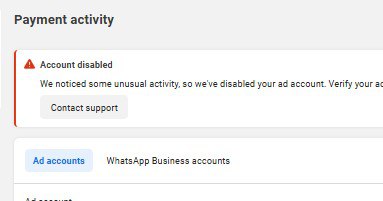
- AD ACCOUNT DISABLED, WE WEREN’T ABLE TO PROCESS PAYMENT
- Facebook Ads in Ghana: How Small Businesses Can Use Facebook and Instagram Ads to Get More Customers
It can happen when Meta cannot complete an authorization attempt on your payment method. Possible causes include insufficient available funds, payment-method restrictions, currency conversion issues or technical problems.
The available balance may not be the only factor. The attempted authorization, currency conversion, bank restrictions or a technical payment issue can also affect whether the transaction succeeds.
Check your payment activity, confirm your available balance, allow for currency conversion, verify your card and try the payment again. If the problem continues, contact Meta Advertising Support.
You can try another legitimate payment method if you’ve confirmed that your existing card and balance are not the problem. If multiple cards produce the same error, further troubleshooting or Meta support may be necessary.
Yes. If your advertising account uses one currency and your bank card uses another, exchange rates and applicable charges can affect the amount needed for a transaction.
Not as your first solution. Try resolving the payment issue through your existing account and Meta support first. A new advertising account should only be considered when appropriate and permitted.