Facebook rejects an ad when it breaks one of Meta’s advertising policies. The most common triggers are restricted or prohibited content, misleading or exaggerated claims, too much text or a poor landing page, or a problem with the ad account itself. Almost every rejection is fixable — here is each common reason and exactly how to fix it.
Why was my Facebook ad rejected?
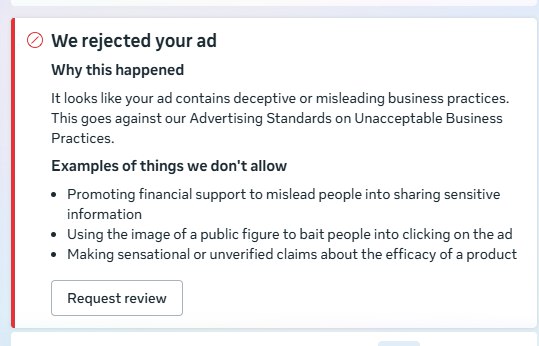
When you publish an ad, Meta reviews it (mostly automatically) against its Advertising Standards before it can run. If something looks like it breaks a rule, the ad is marked Rejected and will not deliver. A rejection is not a ban — it usually means one fixable issue on that specific ad, and you can edit it or request a review.
The most common rejection reasons — and how to fix each
| Reason | How to fix it |
|---|---|
| Restricted or prohibited content (alcohol, tobacco, weapons, drugs, adult, dubious health or financial claims) | Remove or adjust the content, and follow Meta’s rules for restricted categories. |
| Misleading or exaggerated claims (“get rich quick”, “guaranteed”, “cure”) | Remove unrealistic promises. Keep every claim honest and provable. |
| Personal attributes (implying you know someone’s race, religion, health, or money situation) | Reword to address the audience generally — avoid “Are YOU broke/depressed?” style copy. |
| Broken or mismatched landing page | Make sure the link works, matches the ad, loads fast on mobile, and has no pop-ups or blocked content. |
| Too much text or shocking imagery | Use clean visuals; avoid sensational or before/after body images. |
| Trademark or brand misuse | Do not imply endorsement by Meta or a brand you do not represent. |
| Engagement bait or clickbait (“like & share to win”) | Remove the bait and write genuine, specific copy. |
| Payment or account-quality flag | Verify your payment method and identity, and resolve any account warnings. |
How to request a review (appeal a rejected ad)
- Open Ads Manager and find the ad marked Rejected.
- Click the rejection notice, then Request review (or use Account Quality at facebook.com/accountquality).
- Confirm and wait — reviews usually finish within a few hours, sometimes up to a day.
Often the fastest route is simply to edit the ad to fix the issue; saving the edit automatically resubmits it for review.
Why do my ads keep getting rejected?
Repeated rejections usually point to a pattern rather than bad luck — a flagged landing page or domain, a policy your whole account keeps hitting, or an account-quality problem. Fix the root cause instead of resubmitting the same ad, because too many violations can restrict or disable the account. If your ad was approved but still is not delivering, that is a different issue — see our guide on ads stuck in “Preparing” or review and the “ad may get zero results” error.
How to avoid rejections in future
- Skim Meta’s Advertising Standards for your niche before you launch.
- Avoid “you”/personal-attribute wording and health or money guarantees.
- Keep landing pages fast, honest and matching the ad.
- Warm up new ad accounts slowly rather than spending big on day one.
If you would rather not fight the policy maze yourself, GIET can manage your Facebook and Instagram ads in Ghana end to end. New to ads? Start with our guide on Facebook and Instagram ads for Ghanaian businesses.
Frequently asked questions
How long does a Facebook ad review take?
Usually within 24 hours, and often just a few minutes. If it takes much longer, the ad may be stuck in review rather than rejected.
Does a rejected ad hurt my account?
One rejection is harmless. Repeated policy violations, however, can restrict or disable your ad account.
Can I edit a rejected ad instead of appealing?
Yes. Editing the ad to fix the problem automatically resubmits it for review, which is often faster than a formal appeal.
Why was my ad rejected when it follows the rules?
Automated review sometimes makes mistakes. Request a manual review, and it is often approved within hours.