A Facebook Business Portfolio (previously called Business Manager) is the free Meta tool that keeps your Facebook Pages, Instagram account, ad accounts and team members together in one secure place. You create one in a few minutes at business.facebook.com ? here is the full 2026 walkthrough, plus fixes for the errors people hit most often.
What is a Facebook Business Portfolio?
A Business Portfolio is the container that holds all your business assets on Meta ? your Facebook Page, Instagram profile, ad account, Pixel and the people who help you run them. Instead of running ads from a personal profile, you manage everything from one professional, permission-controlled place.
In 2026, Meta renamed Business Manager to Business Portfolio and moved most controls into Meta Business Suite. The tool is the same ? only the name and layout changed ? so older guides that say “Business Manager” still describe the same thing.
Why you need one
- Run and pay for ads properly, separate from your personal account.
- Give staff or a freelancer access without sharing your password.
- Keep your Page and ad account safe if a team member leaves.
- Unlock the Pixel, Conversions API and audiences you need to track real sales.
What you need before you start
- A personal Facebook account (used only to log in ? your business details stay separate).
- Your business name, and a Facebook Page (you can create one during setup).
- A valid payment method for when you are ready to run ads.
How to create a Facebook Business Portfolio (step by step)
- Go to business.facebook.com and log in with your personal Facebook account.
- Click Create a portfolio (or the + in Business settings).
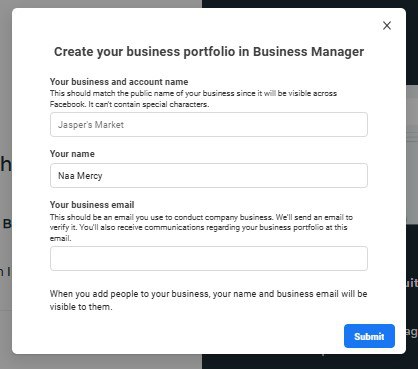
- Enter your business name, your name, and your business email address.
- Add your business details (country, address, phone, website) and submit.
- Check your email and click the confirmation link to verify the address.
That is it ? your Business Portfolio now exists. The next steps are adding your Page, an ad account, and any team members.
How to add your Facebook Page
In Business settings → Accounts → Pages, click Add, then Add a Page and enter your Page name or URL. If you already own the Page, it connects instantly. If it belongs to someone else, choose Request access instead of adding it, so ownership stays clean.
How to add or create an ad account
Go to Business settings → Accounts → Ad accounts → Add. You can claim an existing ad account, request access to one, or create a new ad account. When creating one, set the account name, your time zone (choose Africa/Accra for Ghana) and currency. Choose your currency carefully ? it cannot be changed later.
Once created, add a payment method under Billing → Payment settings. If you get stuck verifying your card, follow our guide on verifying your payment method on Facebook.
How to add people to your Business Portfolio
Under Business settings → People → Add, enter the person’s email and choose their access level (Employee or Admin), then assign the specific Page and ad account they need. They receive an email invite. Give Admin rights only to people you fully trust, and use Employee access for everyone else.
Common problems and how to fix them
| Problem | How to fix it |
|---|---|
| “You’ve reached your business creation limit” | New accounts can create only 1 ?2 portfolios. Use the one you have, or verify your business first. |
| Can’t add a Page ? “already owned” | Use Request access, or ask the current owner to remove it first. |
| Ad account disabled right after creating it | Complete business verification and add a valid payment method; don’t run ads from a brand-new account immediately. |
| Confirmation email never arrives | Check spam, confirm the email is correct in settings, and resend. |
| “Something went wrong” during creation | Try a different browser, turn off ad blockers, and use a stable connection. |
What to set up next
With your portfolio ready, complete Meta business verification, install your Pixel, and connect a payment method. Then you are ready to launch ? our guide on using Facebook and Instagram ads in Ghana walks through your first profitable campaign. For hands-on help, GIET runs practical Facebook ads training in Ghana.
Frequently asked questions
Is a Facebook Business Portfolio free?
Yes. Creating and using a Business Portfolio is completely free. You only pay for the ads you choose to run.
Is Business Portfolio the same as Business Manager?
Yes. Meta renamed Business Manager to Business Portfolio in 2026. The features are the same; only the name and layout changed.
Can I have more than one Business Portfolio?
New accounts are usually limited to one or two. Once your business is verified and in good standing, you can request more if you genuinely need them.
Do I need a Business Portfolio to boost a post?
No, but you should. Boosting from a Page is quick, but a Business Portfolio gives you proper targeting, the Pixel, billing control and safe team access.